Product

Why PiggyPulse Custom budget periods Budget by paycheck Manual expense tracker Calm budgeting app No-ads finance app Budget app for expats No bank connection Private budget app Web and iOS

Resources

Blog Support Privacy Policy

Language

Appearance

Open Web App

Create budget periods that fit your real life

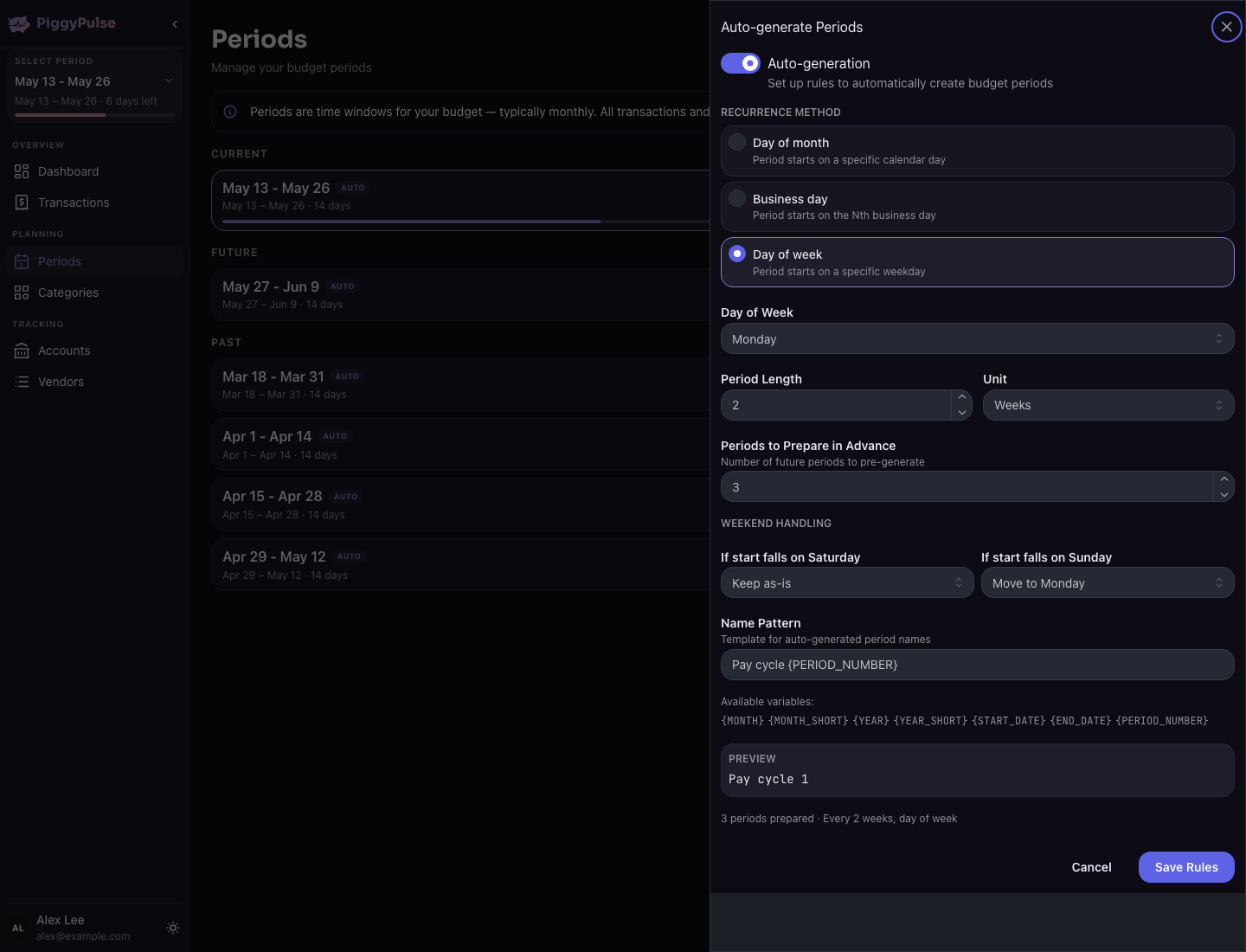
PiggyPulse lets you create flexible budget periods, so you can track money weekly, fortnightly, monthly, by payday, or with your own custom date ranges.

Free for now. No credit card required.

Any useful window of time

  • Weekly, fortnightly, monthly, or custom ranges
  • Trip, event, reset, or payday windows
  • Manual tracking inside each period
  • No financial advice or pressure

Flexible date ranges

Create budget periods around the dates that matter to you, not only the first and last day of the month.

Weekly, fortnightly, or monthly

Use the rhythm that matches your income, bills, habits, or planning style.

Manual tracking

Add transactions yourself so each budget period reflects what actually changed.

Calm review

Review each period without streaks, badges, guilt loops, or pressure.

PiggyPulse product preview for this budgeting workflow

Your budget does not have to start on the first of the month

Traditional budgeting often assumes that every plan starts on the first day of the month and ends on the last. That can work for some people, but it does not match everyone’s life.

Your income might arrive weekly or fortnightly. Your bills might cluster around different dates. You might want to plan around a trip, a school term, a family event, or a personal reset day. A fixed monthly budget can make those situations harder to understand.

PiggyPulse is built around budget periods, so the time window can match the way your money actually moves.

Choose the period you want to understand

A budget period in PiggyPulse is a date range for reviewing your money. You decide when it starts, when it ends, and what you want to track inside it.

1

Set your dates

Create a budget period for a week, two weeks, a month, or any custom date range.

2

Track what changes

Add income and expenses manually so the period reflects your real activity.

3

Review the period

Check what is available, what changed, and how the current period is going.

Budget periods for more than monthly planning

PiggyPulse gives you the flexibility to create budget periods that match how you actually plan.

Weekly period

Use one budget period per week for short planning cycles and frequent check-ins.

Fortnightly period

Create a two-week period around a fortnightly payday or a two-week spending plan.

Payday-to-payday period

Start a period when income arrives and end it before the next payday.

Trip or event period

Track spending for a specific trip, event, or short-term financial window.

Mid-month reset

Start your budget on the date that feels useful to you, even if that is not the first day of the month.

Irregular income period

Create a custom period when your income does not follow a predictable schedule.

Made for people who need a more flexible budget rhythm

PiggyPulse is a good fit if a standard monthly budget feels too rigid for the way your money actually works.

  • You want budget periods with custom start and end dates.
  • You get paid weekly, fortnightly, monthly, or irregularly.
  • You want to track a specific trip, event, or short-term plan.
  • You prefer manual tracking over automatic bank imports.
  • You want a calm budgeting app without ads or guilt.
  • You want your budget to match your real schedule.

Good to know PiggyPulse helps you organise and review budget periods. It does not give financial advice or automatically decide how you should spend your money.

Flexible budgeting without unnecessary noise

PiggyPulse gives you practical tools for tracking budget periods while keeping the experience calm and manual.

PiggyPulse helps you

  • Create custom budget periods
  • Track accounts and transactions manually
  • Review money by date range
  • Budget around weekly, fortnightly, or irregular rhythms
  • Keep budgeting calm and focused

PiggyPulse does not

  • Force every budget into a calendar month
  • Connect directly to your bank
  • Automatically import bank transactions
  • Show ads based on your spending
  • Use streaks or guilt to keep you engaged

Flexible periods, simple tracking

PiggyPulse combines custom budget periods with manual transaction tracking, account overviews, and a calm privacy-first design.

Custom budget periods

Create budget periods around the date ranges that matter to you.

Manual transactions

Add spending and income yourself so your budget stays intentional.

Account overview

See what is available and what changed across the accounts or categories you track.

Private and calm

PiggyPulse has no bank connection, no ads, no tracking, and no guilt-based design.

Use the guide that matches the job

Custom periods are the broad idea. These pages cover adjacent reasons people choose PiggyPulse.

Read the budget-by-paycheck guide

Read the no-bank-connection overview

Read the private budget app overview

Custom budget periods FAQ

Can I create custom budget periods in PiggyPulse?

Yes. PiggyPulse lets you create budget periods with custom start and end dates.

Do I have to budget monthly?

No. PiggyPulse supports flexible budget periods, so you can budget weekly, fortnightly, monthly, by payday, or with your own custom date ranges.

Can I use PiggyPulse for weekly or fortnightly budgeting?

Yes. You can create weekly or fortnightly budget periods that match your planning rhythm.

Can I create a budget period for a trip or event?

Yes. You can create a custom budget period for a specific date range, such as a trip, event, or short-term financial plan.

Does PiggyPulse connect to my bank?

No. PiggyPulse is manual-first and does not connect directly to your bank or ask for your online banking credentials.

Is PiggyPulse free?

Yes. PiggyPulse is free for now.

Can I use PiggyPulse on web and iPhone?

Yes. PiggyPulse is available as a web app and an iOS app.

Start budgeting on your own schedule

Create flexible budget periods, track transactions manually, and review your money without forcing every plan into a calendar month.

Free for now. No credit card required.